


Add an icon of your favorite website to your smartphone screen.
Advantages: We will be just one click away, and you will enjoy an experience similar to a mobile application. Everything is free and does not take up additional memory on your phone.
I. Instructions for iPhone (Safari)
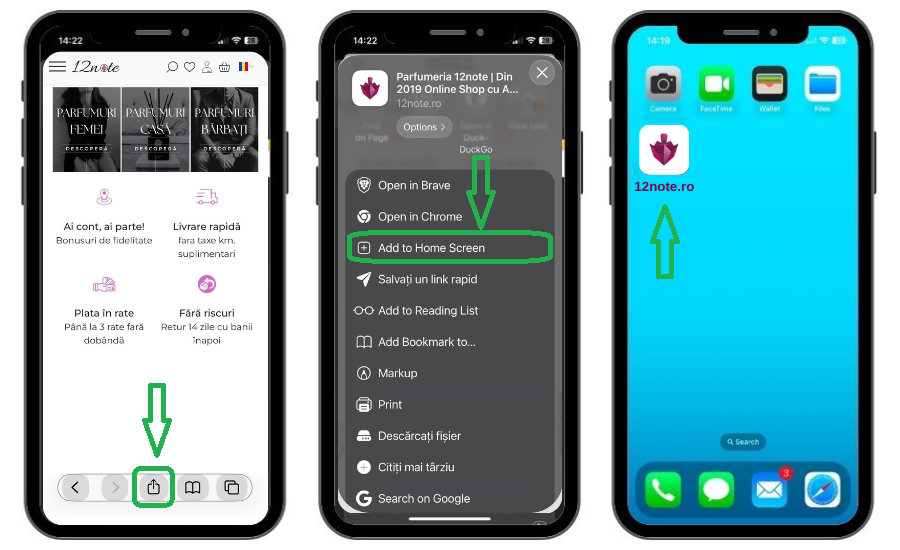
1. Access Safari and enter www.12note.ro. Click on the "Share" button (the square with the up arrow).
2. Scroll down and choose the "Add to Home Screen" option.
3. Confirm by pressing "Add" in the upper right corner.4. Check on one of the home screens and see where the icon was saved.
If you don't see the option “Add to home screen”, you can add it manually: scroll to the bottom of the list, click “Edit actions”, then click the + next to the option. Then repeat the steps above.
II. Hints for Android (Chrome)
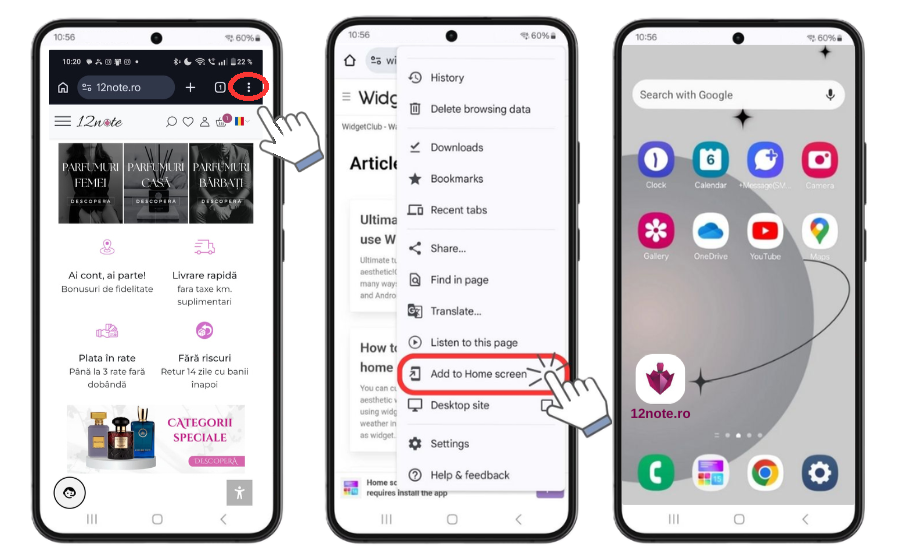
1. Access Chrome and go to www.12note.ro. Click on the three dots in the upper right corner.
2. Select "Add to Home Screen" or "Install app" (depending on your device).
3. Follow the on-screen instructions to confirm.
4. Check on one of the home screens and see where the icon was saved.